
Navigate the pre-owned Tesla market with confidence, from battery health to hardware and hidden gems.
Highlights for Smart Shoppers:
- Battery Health is Paramount: Always prioritize verifying the battery's state of health (SoH) through in-car tests or 100% charge range checks. This is the single most critical factor for long-term satisfaction.
- Sweet Spot for Value: Model 3s from 2020-2022 often offer the best balance of modern features, proven reliability, and attractive pricing in 2026.
- Understand Autopilot Hardware: Not all Autopilot is created equal. Ensure the car has at least Hardware 3 (HW3) if you're interested in current Full Self-Driving (FSD) capabilities.
The Tesla Model 3 has revolutionized electric vehicle ownership, blending impressive performance, cutting-edge technology, and a distinct driving experience. As we look at the used market in 2026, a pre-owned Model 3 presents an increasingly attractive proposition, offering a gateway into EV ownership at a more accessible price point. However, buying a high-tech used car like a Tesla requires a discerning eye and a structured approach to ensure you get a reliable vehicle that meets your expectations.
This comprehensive guide will walk you through every essential step. We'll explore which model years and trims offer the best value, how to meticulously check battery health, decipher Autopilot hardware versions, identify common issues, understand fair pricing, and navigate the various purchase avenues—from private sellers to Tesla's own Certified Pre-Owned (CPO) program. By following this checklist, you'll be equipped to make an informed decision and confidently drive away in your ideal used Tesla Model 3.
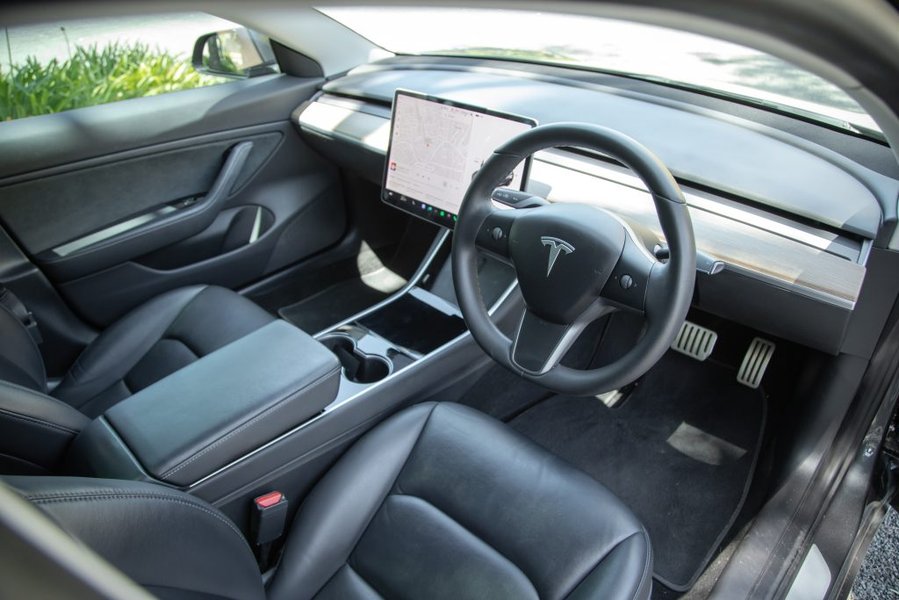
A used Tesla Model 3 offers an attractive blend of technology and value.
Why a Used Tesla Model 3 in 2026 is a Smart Choice
The Model 3 stands out in the used car market for several compelling reasons. Unlike many traditional vehicles, Teslas receive continuous over-the-air (OTA) software updates that can introduce new features, improve performance, and even enhance safety systems. This means that a Model 3 from a few years ago can still feel remarkably current. Furthermore, their electric powertrains boast fewer moving parts than internal combustion engines, often translating to lower maintenance costs. Combined with access to Tesla's industry-leading Supercharger network and generally strong resale values, a used Model 3 is a compelling option for those ready to embrace electric mobility.
Navigating Model Years and Trims for Optimal Value
Tesla's approach to vehicle updates is unique, often rolling out changes throughout the year rather than adhering to strict annual model changes. This fluidity means understanding specific updates linked to production periods is more important than just the model year. For used buyers in 2026, the various trims also offer distinct advantages depending on your needs.
Decoding the Model 3 Evolution
| Model Year Range | Key Characteristics | Ideal for | Considerations |
|---|---|---|---|
| 2017-2018 (Gen 1) | Early production, potential for HW2.5, most affordable. | Budget-conscious buyers, local commuting. | Early build quality variations, camera harness wear, older software limitations for FSD. |
| 2019-2020 (Gen 1.5) | Matured production, often includes HW3 for FSD, strong value proposition. | Value-driven buyers, those seeking a balance of features and price. | Out-of-warranty concerns, panel alignment checks. |
| 2021-2023 (Gen 2 - "Refresh") | Interior updates (chrome delete, heat pump), improved build, power trunk. | Buyers prioritizing refined aesthetics, better efficiency, and modern amenities. | Check suspension noises; generally robust. |
| 2024-2026 ("Highland") | Significant exterior/interior redesign, no stalks, rear screen, HW4. | Latest design, enhanced comfort, advanced hardware for FSD. | Premium pricing, new control layout may require adjustment. |
For many shoppers in 2026, the 2020-2022 Model 3 represents an excellent sweet spot. These models offer a compelling blend of modern features, including the crucial Hardware 3 for Full Self-Driving capability (if enabled), improved build quality over earlier versions, and a more favorable price point compared to the newer "Highland" models. The "Highland" refresh, introduced in late 2023, brought substantial changes like a quieter cabin, ventilated seats, and a redesigned interior, but also introduced a stalk-less control scheme that some drivers find less intuitive.
Understanding Trim Levels: Range, Performance, and Practicality
Tesla's trim levels directly relate to range and performance. Here's a quick breakdown to help you decide:
- Standard Range (SR) / Rear-Wheel Drive (RWD): The most economical option, offering a respectable range for daily driving. Newer RWD models (e.g., 2026) can achieve significant EPA ranges, making them highly practical for most commuters.
- Long Range (LR) / All-Wheel Drive (AWD): This trim provides substantially more range and enhanced performance thanks to its dual motors and all-wheel drive. It's often considered the best all-rounder, ideal for varied weather conditions and longer road trips.
- Performance (P) / All-Wheel Drive (AWD): The top-tier for enthusiasts, sacrificing a small amount of range for maximum acceleration and sportier handling features like upgraded brakes and track mode.
Important Note: Always confirm the specific trim and original EPA range for the exact model year you're considering, as these figures have evolved significantly over the years.
Battery Health: The Cornerstone of Your EV Investment
The battery pack is arguably the most critical component in any electric vehicle. While Tesla batteries are engineered for longevity, some degradation is natural over time and mileage. A robust battery ensures optimal range, efficient charging, and long-term reliability. Conversely, a significantly degraded battery can lead to reduced usability and potentially expensive future repairs.
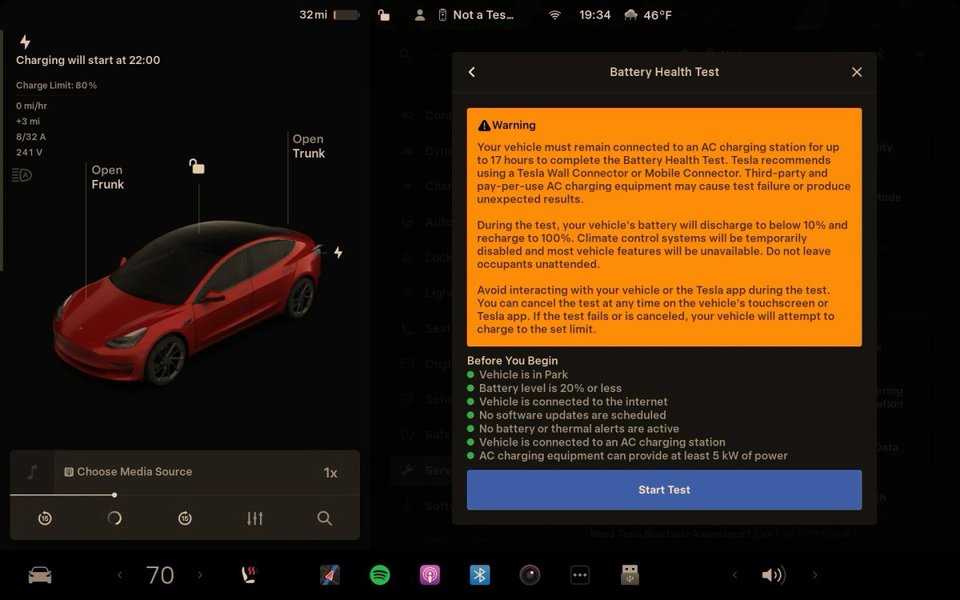
Checking battery health directly from the Tesla infotainment screen.
Verifying Battery Health: Step-by-Step Methods
- The In-Vehicle Battery Health Test:
- Availability: This feature is typically found in Model 3 and Y vehicles running software update 2025.8.3 or newer. However, Tesla has occasionally removed or re-enabled this feature, so its presence can vary by software version and region.
- Prerequisites: To run the test, the car’s battery charge should ideally be below 20%. Ensure all pending software updates are complete, and there are no active high-voltage battery or thermal management warnings. The vehicle must be connected to an AC charger for the test to initiate.
- Process: Navigate to
Controls > Service > Battery Health Teston the touchscreen. The test involves a controlled discharge from below 20% to below 10%, followed by a full recharge to 100%. This process analyzes the battery's capacity and can take a considerable amount of time, often 10-24 hours. - Results: The screen will display a percentage indicating the battery’s energy retention compared to its original capacity. If the reported health is significantly low or affects usability, Tesla service will be recommended.
- The 100% Charge Test (Quick Indicator):
- This is a simpler, though less precise, method. Ask the seller to charge the vehicle to 100% and let it rest for at least 30 minutes. Note the "Rated Range" displayed on the screen.
- Compare this figure to the original EPA-rated range for that specific model year and trim. For instance, if a Long Range Model 3 originally rated for 341 miles now shows 310 miles, it indicates approximately 91% battery health.
- Important Note: The displayed range can fluctuate based on recent driving habits and ambient temperature, so view this as an estimate rather than a definitive health report.
- Reviewing Charging History and Habits:
- Inquire about the seller's typical charging routine. Cars primarily charged at home via AC (Level 1 or Level 2) tend to experience slower degradation than those frequently relying on DC fast charging (Supercharging).
- Ask about typical charge limits. Consistently charging to 100% or leaving the car at very low states of charge for extended periods can accelerate battery wear.
- Third-Party Tools (where available):
- Services like Recurrent offer free battery health reports for Tesla owners in some regions. These platforms analyze vehicle data over time to provide insights into battery performance. While useful, they require the owner to have participated in the program.
Tesla’s battery warranty typically covers the battery for 8 years or 100,000-120,000 miles (depending on the drivetrain), guaranteeing at least 70% of the original capacity during this period. If a used Model 3 is still within this warranty window and falls below the 70% threshold, Tesla is obligated to repair or replace the battery pack at no cost.
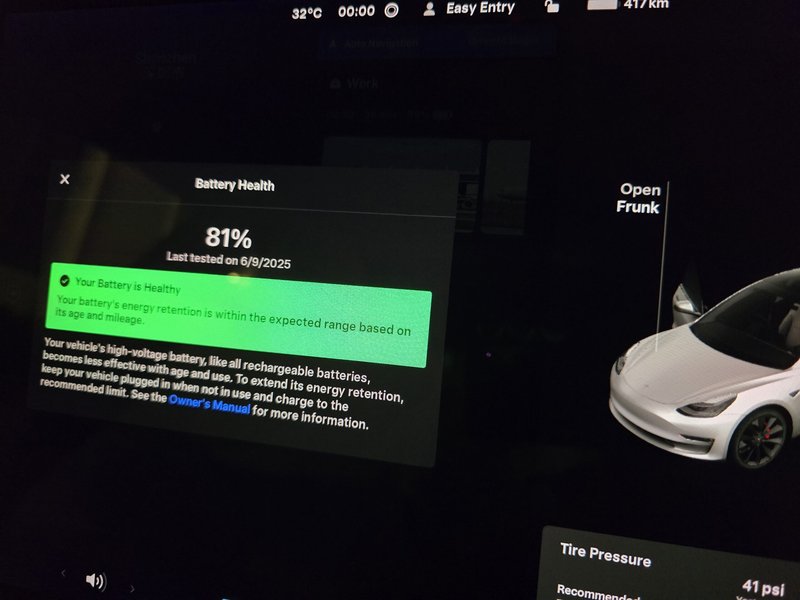
An example of a Tesla battery health report after significant mileage.
Owner Reported Battery Health Examples:
| Model Year / Trim | Mileage | Reported Battery Health | Notes |
|---|---|---|---|
| 2020 LR | 100,000 miles | 85% | Normal degradation for age and mileage. |
| 2019 LFP | 100,000 miles | 93% | LFP batteries can maintain higher health with 100% daily charges. |
| 2018 LR | 150,000 miles | 91% | Exceptional retention, likely due to favorable charging habits. |
Red Flag Warning: Be wary if a seller cannot provide any form of battery health verification or refuses a 100% charge test. This could indicate hidden issues.
Autopilot and Full Self-Driving (FSD) Hardware: What You're Getting
Tesla’s advanced driver-assistance systems are a significant selling point, but their capabilities are heavily dependent on the underlying hardware. Understanding the hardware version (HW) is crucial, as it dictates what features are available and what upgrades are possible.
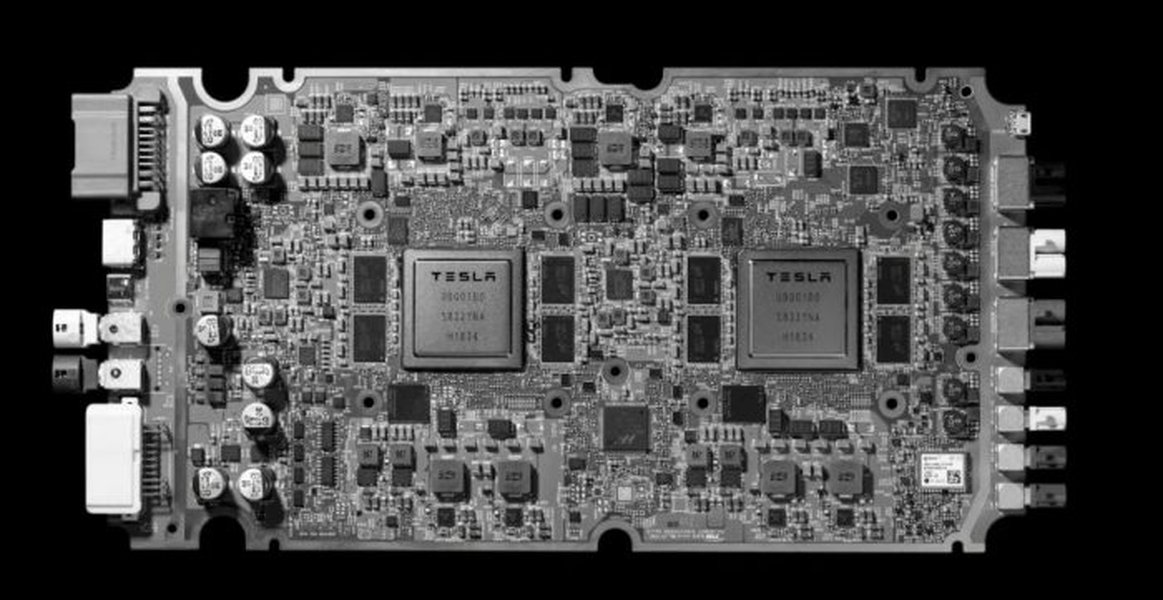
Illustration of Tesla's Full Self-Driving computer (Hardware 3).
Key Hardware Generations:
- HW2.5: Found in earlier Model 3s (e.g., some 2017-2018 models). These vehicles support basic Autopilot features but are not capable of running the latest FSD software.
- HW3 (Full Self-Driving Computer): Many Model 3s from April 2019 onwards came equipped with HW3. This hardware is FSD-capable, meaning it can run the advanced FSD software if purchased or subscribed to. Most used Model 3s in 2026 will likely have HW3.
- HW4: Introduced with the "Highland" Model 3 refresh (late 2023 onwards), HW4 represents an upgrade in processing power and sensor suite, offering enhanced capabilities for future FSD advancements.
You can typically verify the hardware version through the vehicle's touchscreen menu under "Software" or "Additional Vehicle Information." If a car has HW3 but not FSD enabled, you can opt to subscribe to FSD for a monthly fee or purchase it outright, adding significant value to the vehicle.
Important Distinction: Differentiate between "Basic Autopilot" (standard on all Teslas, including traffic-aware cruise control and autosteer), "Enhanced Autopilot" (adds features like Navigate on Autopilot, Auto Lane Change, Summon), and "Full Self-Driving" (the most comprehensive package, including traffic light and stop sign control). Always confirm which specific software package is included and active on the vehicle you are considering.
Pre-Purchase Inspection: Common Issues to Scrutinize
Even though Teslas are generally reliable, certain common issues tend to appear, especially on older models. A thorough inspection is crucial to avoid unexpected costs and ensure peace of mind.
Exterior and Build Quality Checks:
- Panel Gaps and Alignment: Early Model 3 production was known for inconsistent panel gaps. Carefully inspect all seams between body panels, doors, hood, and trunk for unevenness. While minor variations are common, significant misalignments can indicate prior accident damage or poor initial build quality.
- Paint Quality: Look for paint chips (especially on the front bumper and lower body panels), swirl marks, or areas where the paint appears thin or uneven. Check for signs of repaint that could suggest accident repairs.
- Glass Integrity: Inspect the windshield, side windows, and the large panoramic glass roof for any cracks, chips, or deep scratches. Also, check for condensation inside headlights or taillights, which can indicate a faulty seal.
- Door Handles and Charge Port: Ensure door handles operate smoothly and are flush with the body when closed. Test the charge port to make sure it opens and closes without issue and look for any damage or debris inside.
- Wheels and Tires: Check for curb rash on the wheels and inspect tire tread depth for even wear. Uneven tire wear can point to alignment issues or suspension problems. Ideally, all four tires should be of the same brand and model.
Interior and Functional Inspection:
- Touchscreen Responsiveness: The central touchscreen is the primary interface. Test its responsiveness, look for dead pixels, discoloration, or excessive scratches. On "Highland" models, also inspect the rear passenger screen.
- Seat Wear: Check for tears, stains, or excessive wear on the seats, particularly on the driver’s side bolsters. Test all seat adjustments, including heating and ventilation if equipped.
- Buttons and Controls: Test all physical buttons and steering wheel scroll wheels (including the new turn signal buttons on "Highland" models). Ensure all windows operate smoothly and that the climate control system works effectively for both heating and cooling.
- Suspension Noises: During a test drive, listen carefully for any squeaks, rattles, or clunks, especially when going over bumps or turning at low speeds. Noisy front upper control arms are a known issue on some older Model 3s.
- Dampness: Lift floor mats and feel for any dampness underneath, which could indicate a water leak, particularly around the panoramic roof or window seals.
Expert Tip: Consider a pre-purchase inspection by an independent mechanic specializing in EVs or even a Tesla Service Center, especially for older models or if you're buying from a private seller.
Fair Pricing Ranges and Purchase Avenues in 2026
The used Tesla Model 3 market in 2026 is dynamic, with prices influenced by model year, trim, mileage, battery health, Autopilot/FSD features, and overall condition. Knowing where to buy can also significantly impact your experience and the price you pay.
Understanding Pricing Factors:
While precise figures fluctuate, here are estimated ranges for August 2026. These are general guidelines; always check current market data for specific models.
| Model Year | Standard Range (RWD) | Long Range (AWD) | Performance (AWD) |
|---|---|---|---|
| 2017-2018 | $18,000 - $25,000 | $22,000 - $30,000 | $25,000 - $32,000 |
| 2019-2020 | $22,000 - $30,000 | $28,000 - $38,000 | $30,000 - $40,000 |
| 2021-2023 | $28,000 - $36,000 | $35,000 - $45,000 | $38,000 - $48,000 |
| 2024 ("Highland") | $38,000 - $45,000 | $45,000 - $55,000 | $48,000 - $58,000 |
These ranges are estimates and depend heavily on geographical location, current market demand, and the car's specific condition and mileage. A clean history report, documented battery health, and desirable software features (like FSD capability) can command higher prices.
Federal Tax Credit: Some used EVs, including certain Model 3s priced under $25,000 and purchased from a licensed dealer, may qualify for a federal clean vehicle tax credit of up to $4,000. Verify eligibility requirements carefully as they can change.
Where to Buy Your Used Model 3:
- Tesla Certified Pre-Owned (CPO):
- Pros: Includes an additional 1-year/10,000-mile limited warranty beyond the original factory warranty. Vehicles undergo a thorough inspection. A straightforward process with guaranteed authenticity.
- Cons: Often the most expensive option. Limited inventory and less room for price negotiation compared to other sources.
- Best for: Buyers seeking maximum peace of mind and official Tesla support.
- Third-Party Dealers:
- Pros: Wider selection of vehicles and potentially more competitive pricing than Tesla CPO. Some dealers offer their own warranties or financing options.
- Cons: Knowledge of EVs and Teslas can vary significantly among dealerships. The transparency regarding battery health and service history might be inconsistent.
- Best for: Shoppers who want to compare many cars and are comfortable with negotiation, but still want some dealer protections.
- Private Party Sale:
- Pros: Typically offers the best prices and the most room for negotiation. You can speak directly with the previous owner to understand the car's history and charging habits.
- Cons: No warranty (unless the factory warranty is still active and transferable). All inspection and verification responsibilities fall on you. Higher risk if you're not thoroughly prepared.
- Best for: Budget-conscious buyers willing to do extensive homework and inspection, or those who can bring an EV specialist for a pre-purchase check.
Essential Questions to Ask Before Handing Over Money
Being prepared with a comprehensive list of questions is critical to uncovering potential issues and ensuring full transparency. Don't hesitate to ask for documentation or demonstrations.
Battery & Charging Specifics:
- "What is the current estimated range at 100% charge displayed on the screen?"
- "Can you show me the results of the in-car Battery Health Test (if available)?"
- "What were your typical charging habits? How often was it Supercharged (DC fast charging) versus home AC charging?"
- "What was your usual daily charge limit set to?"
- "Has the car ever had any battery-related service or repairs?"
Service History & Warranty:
- "Can I see the full service history, ideally through the Tesla app or service records?"
- "What is the remaining factory warranty period for the vehicle and specifically for the battery and drivetrain?" (Tesla's battery/drivetrain warranty is 8 years/100,000-120,000 miles).
- "Have there been any major repairs, especially out-of-warranty ones? Can I see the invoices?"
- "Are there any open recalls or service bulletins that need to be addressed?"
Software & Hardware Features:
- "What Autopilot/FSD hardware version does the car have (HW2.5, HW3, or HW4)?"
- "Is Full Self-Driving (FSD) included and active, or is it a subscription?"
- "What is the current software version installed on the car?"
- "Does the car receive regular over-the-air updates without issues?"
General Condition & Ownership:
- "Why are you selling the car?" (Provides insight into potential underlying issues).
- "Has the car ever been in an accident? Can I see a vehicle history report (Carfax/AutoCheck)?"
- "Are there any known cosmetic imperfections or unusual panel gaps?"
- "Can I have a pre-purchase inspection performed by an independent EV specialist or Tesla Service Center?"
- "Are all accessories included (e.g., mobile connector, J1772 adapter, key cards, floor mats)?"
- "How will the Tesla account be transferred to me to ensure full mobile app functionality?"
The Ultimate Delivery Day Checklist: Final Verification
Even after asking all the right questions and taking a test drive, a thorough inspection on delivery day is paramount. This checklist ensures you don't overlook any crucial details before finalizing your purchase.
Before You Arrive:
- Download the Tesla app and ensure you have a Tesla account ready.
- Have this checklist printed or easily accessible on your phone.
- Request the seller to charge the car to 100% a few hours before your arrival, allowing time for it to settle for an accurate range reading.
Exterior Inspection:
- VIN Verification: Match the VIN on the car (dashboard, door jamb) with all paperwork.
- Paint & Body: Methodically check every panel for scratches, dents, chips, swirl marks, or paint inconsistencies. Pay close attention to areas prone to stone chips like the front bumper and rocker panels.
- Panel Gaps: Re-check all gaps around doors, hood, trunk, and fenders for consistent alignment.
- Glass & Lighting: Inspect the windshield, side windows, and panoramic roof for any damage. Ensure all lights (headlights, taillights, brake lights, turn signals, fog lights) work and show no internal condensation.
- Wheels & Tires: Examine wheels for curb rash. Check tire tread depth and evenness across all four tires. Verify tire pressure.
- Charge Port: Open and close the charge port several times. Inspect for any damage, debris, or proper sealing.
- Frunk & Trunk: Open and close both the front and rear trunks. Ensure they latch securely and inspect their interiors for cleanliness and any signs of water intrusion.
Interior Inspection:
- Seats: Inspect all seats for tears, stains, wrinkles, or excessive wear, especially on the driver's seat. Test all adjustments and heating/ventilation functions.
- Dashboard & Trim: Check for scratches, scuffs, or rattles on the dashboard and interior trim pieces.
- Steering Wheel: Inspect for wear. Test all buttons and scroll wheels (including turn signal/gear selector buttons on Highland models). Confirm horn functionality.
- Touchscreen: Verify the touchscreen is fully responsive, free of dead pixels, and not excessively scratched. Test navigation, media, climate, and vehicle settings. On Highland models, check the rear screen.
- Climate Control: Test both AC and heat, fan speeds, and ensure all vents are functional.
- Console & Storage: Open and close all storage compartments. Test USB ports and the wireless charging pad.
- Floor Mats: Ensure they are present, in good condition, and that there is no dampness underneath.
- Sound System: Test the radio, Bluetooth audio, and all speakers.
Functional & Software Checks:
- Key Cards/Fobs: Confirm you receive all original key cards and any associated fobs, and test their functionality.
- Software Version: In the "Software" menu, confirm the software version is recent.
- Warning Lights: Ensure no persistent warning lights or alerts are displayed on the screen.
- Charging Functionality: If possible, plug into an AC charger to confirm charging initiates correctly.
- Mobile App Link: Confirm the VIN can be successfully linked to your Tesla account in the mobile app, granting you remote access features.
- Accessories: Verify the inclusion of the mobile connector and the J1772 adapter.
Expert Tip: Remember that "Highland" Model 3s (2024-2026) feature significant interior changes, including the removal of traditional stalks for turn signals and gear selection, which are now integrated into the steering wheel buttons and touchscreen. Familiarize yourself with these new controls if you are considering a newer used model.
FAQ: Your Common Questions Answered
Conclusion: Drive Away with Confidence
Purchasing a used Tesla Model 3 in 2026 is an exciting opportunity to experience advanced electric mobility without the new car price tag. The key to a successful purchase lies in meticulous research and a diligent inspection. By prioritizing verified battery health, understanding the nuances of model years and Autopilot hardware, thoroughly inspecting for common issues, and asking the right questions, you can navigate the market with confidence.
Armed with this guide, you're well-equipped to avoid common pitfalls and secure a Model 3 that delivers years of thrilling, efficient, and technologically advanced driving enjoyment. Take your time, trust your instincts, and don't hesitate to seek professional assistance when in doubt. Happy hunting, and welcome to the world of Tesla ownership!
