

Master the art of assessing your electric vehicle's battery, from simple checks to professional insights, ensuring peace of mind for every mile.
- Demystify Battery Health: Understand what State of Health (SoH) truly means and how it impacts your EV's performance and value.
- Empower Yourself with Tools: Discover built-in features, essential OBD-II scanners, and cutting-edge apps to monitor your battery at home.
- Protect Your Investment: Learn to identify warning signs of degradation and know precisely when to seek expert professional assessment.
As electric vehicles (EVs) continue to dominate our roads, the heart of these machines – their battery – becomes an increasingly critical component to understand. Whether you're a prospective buyer eyeing a used EV or a current owner eager to prolong your vehicle's life, knowing how to check EV battery health is paramount. This comprehensive guide for 2026 empowers you with the knowledge and tools to confidently evaluate an EV's battery condition, safeguarding your investment and maximizing your driving enjoyment.
Why Battery Health is the New Mileage Metric
In the world of gasoline-powered cars, mileage and engine condition are primary concerns. For electric vehicles, the battery's State of Health (SoH) is the most significant indicator of its true value and longevity. It directly influences driving range, charging speed, and ultimately, the vehicle's resale potential. A healthy battery translates to a reliable, efficient, and valuable EV.
Understanding State of Health (SoH) vs. State of Charge (SoC)
It's crucial to differentiate between two key battery metrics:
- State of Health (SoH): This represents your battery's current usable energy capacity compared to its original capacity when new, expressed as a percentage. A new battery begins at 100% SoH. If an EV has 90% SoH, it means the battery can now hold 90% of the energy it originally could. SoH tells you how much the "tank" has shrunk.
- State of Charge (SoC): This indicates the current charge level of your battery, like a fuel gauge. It tells you how much "fuel" is in the tank right now (e.g., 50% charged). SoC is a temporary measure, while SoH reflects the battery's long-term capability.
Most EV manufacturers offer warranties guaranteeing that the battery won't fall below approximately 70% of its original capacity within eight years or 100,000 to 160,000 kilometers, depending on the model. Understanding your SoH helps you track if your vehicle is within these warranty parameters.
Normal Degradation: What to Expect in 2026
All lithium-ion batteries experience gradual degradation over time, a natural process that slowly reduces their ability to store and deliver energy. Thanks to advancements in battery chemistry and sophisticated thermal management systems, modern EV batteries are remarkably durable. Data from early 2026 indicates that the average EV battery degrades at approximately 2.3% per year. This rate can vary based on several factors, including:
- Charging habits (frequency of DC fast charging versus Level 2)
- Climate and exposure to extreme temperatures
- Driving patterns and aggression
- How often the battery is fully charged or deeply discharged
It's important to note that degradation isn't linear; batteries often show a slightly steeper decline in the first year or two, followed by a more gradual and stable rate. For instance, a well-maintained 3-year-old EV might typically show 92-95% SoH, while after five years, most EVs retain about 88-92% of their original capacity. This means that even after several years, most EVs have plenty of usable range for daily driving.
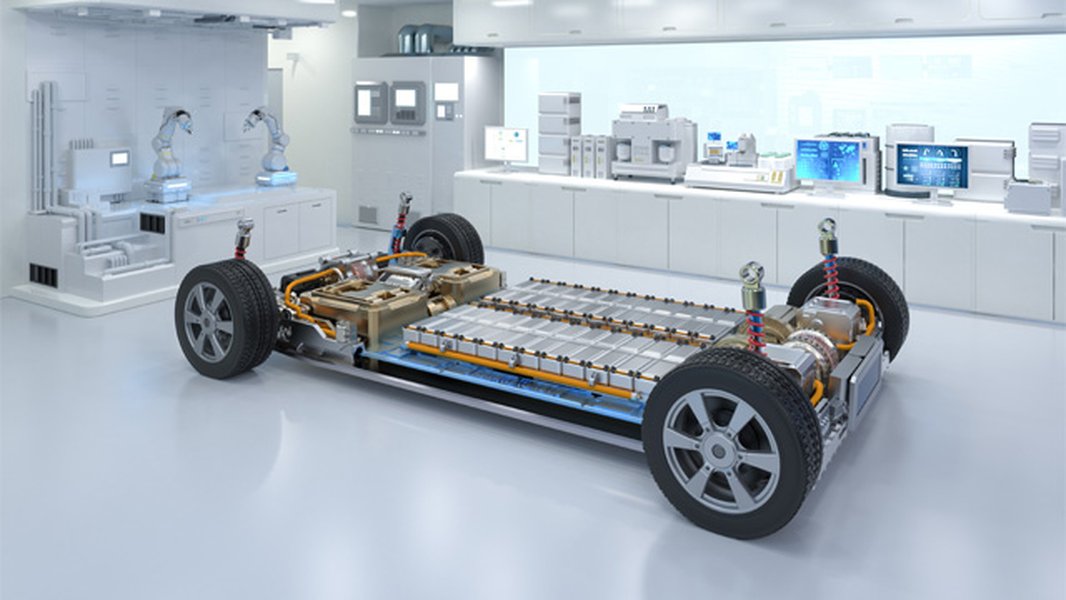
Advanced testing equipment used for EV battery diagnostics.
Spotting the Early Warning Signs of Degradation
While precise numerical data is invaluable, your EV will often provide subtle clues if its battery health is declining. Being attentive to these signs can prompt you to investigate further before issues become more significant.
1. Reduced Driving Range
This is arguably the most noticeable and common indicator. If your fully charged EV consistently travels fewer miles than it used to under similar conditions (temperature, driving style, route), or significantly less than its original EPA estimated range, the battery is likely experiencing capacity loss. Tracking your real-world range over time against a baseline is a practical way to monitor this.
2. Slower Charging Times
As batteries age, their internal resistance can increase, reducing their ability to accept high charging currents efficiently. If you notice that your EV takes significantly longer to reach a certain charge percentage (e.g., 80%), particularly with DC fast charging, it could signal battery degradation. This effect is often more pronounced as the battery's SoH decreases.
3. Performance Limitations and Reduced Responsiveness
A degrading battery may not be able to consistently deliver its peak power output. You might observe subtle changes such as diminished acceleration, a feeling of less responsive power delivery, or even slight variations in how effectively the climate control system operates. The vehicle's Battery Management System (BMS) might intentionally limit power output to protect a severely degraded battery.
4. Persistent Battery Warning Lights and Messages
Modern EVs feature sophisticated BMS that continuously monitor various battery parameters. If your dashboard frequently displays battery-related warning lights or error messages, it's a clear signal that the BMS has detected an abnormality. Never ignore these warnings, as they often indicate issues requiring immediate attention or professional diagnosis.

An example of a battery warning light on an EV dashboard.
5. Increased Need for Thermal Management
Degrading batteries can sometimes become less thermally efficient, requiring more active cooling or heating to maintain optimal operating temperatures. If your EV's battery cooling system (fans, liquid cooling) seems to be running more frequently or intensely, especially during charging or spirited driving, it could be a response to internal changes within the battery pack.
Your Arsenal for Checking EV Battery Health in 2026
Fortunately, assessing an EV's battery health is becoming increasingly accessible. From built-in vehicle features to advanced diagnostic tools, you have several methods at your disposal.
1. Harnessing Built-in Vehicle Systems and Dashboard Displays
Many modern EVs provide some level of battery information directly to the driver, offering a convenient starting point for health checks.
Dashboard Range Estimation
The simplest method involves observing your estimated driving range after a full charge. Compare this number to the original EPA estimated range for your specific model and trim. While not a direct SoH reading (as it's influenced by recent driving habits, temperature, and terrain), a consistent downward trend over time can strongly suggest degradation. It’s best to repeat this process over several charging sessions in similar conditions to identify trends.
Manufacturer Apps and Infotainment Menus
A growing number of automakers are integrating battery health information into their infotainment systems or companion mobile apps. For example:
- Newer Ford models (like the Explorer EV and Capri from MY2026.75+) are expected to show Battery State of Health directly in their built-in menus.
- Certain Hyundai and Kia models (e.g., Ioniq 5, EV6) display estimated battery SoH under their EV settings.
- Tesla vehicles offer some battery information through their service menus.
Consult your vehicle's manual or online forums for your specific model to discover how to access these potentially hidden menus.
2. Empowering Yourself with OBD-II Scanners and Third-Party Apps
For more precise and detailed battery health data, combining an OBD-II (On-Board Diagnostics) scanner with a specialized third-party app is the most popular DIY method. These tools tap directly into your vehicle's Battery Management System (BMS) to retrieve data not typically displayed on the dashboard.
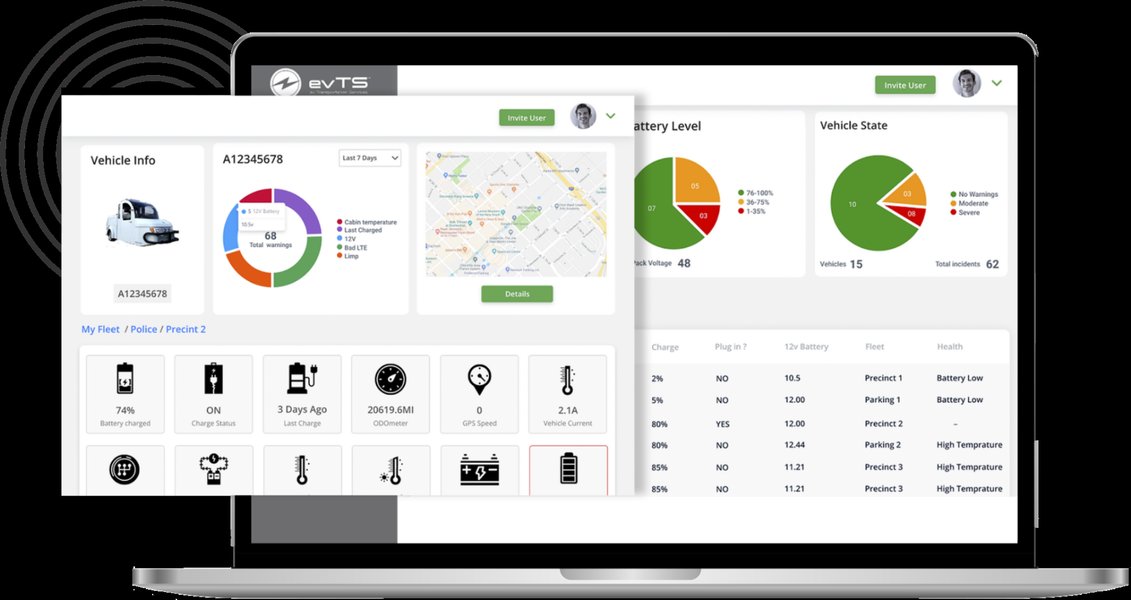
A visual representation of an EV health monitoring system.
Choosing the Right OBD-II Scanner
Not all OBD-II scanners are equally effective for EVs. Look for models known for good compatibility and features like low-power auto-sleep. Top choices for 2026 include:
- OBDLink MX+ and OBDLink CX: Praised for fast data transfer, robust connectivity (Bluetooth 5.1), and overall reliability.
- Vgate iCar Pro and vLinker MC+/FS: More affordable options that offer good compatibility for occasional users.
Remember, the scanner itself only provides a communication link; the real magic happens with the app that interprets the data.
Recommended Apps for Battery Health
Pair your OBD-II scanner with one of these specialized applications:
- Car Scanner ELM (iOS/Android): A versatile app that works with a wide range of EVs, including BMW, Hyundai, Kia, and VW. You'll typically select a specific vehicle profile within the app.
- LeafSpy: Considered the gold standard for Nissan Leaf owners, offering comprehensive, model-specific battery data.
- Scan My Tesla: Specifically designed for Tesla vehicles. Note that Teslas often require a model-specific adapter harness in addition to the OBD-II dongle, as they don't expose a standard OBD port from the cabin.
- EV Notify: Useful for several European EV models.
These apps can reveal critical information such as:
- The true State of Health (SoH) percentage calculated by the BMS.
- Individual cell voltages and temperatures within the battery pack, which can highlight imbalances.
- Charge cycle counts.
- Historical charging data and battery temperature statistics.
Step-by-Step: Using an OBD-II Scanner for Battery Health
- Acquire a Compatible Scanner and App: Purchase one of the recommended OBD-II scanners and download the appropriate app for your EV.
- Locate the OBD-II Port: This port is typically found under the dashboard, usually near the steering column.
- Plug in and Pair: Insert the scanner into the port. Turn your vehicle's ignition to the "on" position (or "ready" to drive) without actually starting. Pair the scanner with your smartphone via Bluetooth.
- Open the App and Configure: Launch your chosen app, select your vehicle's profile, and follow any setup instructions.
- Access Battery Health: Navigate to the battery health or diagnostics section within the app to view your SoH percentage and other detailed data.
"In 2026, you no longer need a dealer service appointment to find out. A $30 OBD-II dongle and the right app give most EV owners the same number a workshop charges $99 to read."
3. Professional Battery Health Reports and Dealer Assessments
For the most definitive and officially recognized assessment, especially when buying a used EV, selling your current one, or investigating potential warranty claims, a professional battery health report is invaluable.
What Professional Testing Includes
Professional EV technicians use specialized diagnostic equipment and software to provide a comprehensive analysis. This often includes:
- Capacity Testing: Measuring the actual energy storage capacity of the battery.
- Internal Resistance Analysis: Checking for increased resistance, which is an indicator of aging and degradation.
- Thermal Imaging: Identifying hot spots or cooling system inefficiencies within the battery pack.
- Cell Balancing Assessment: Evaluating how evenly individual cells or modules are wearing, as imbalances can affect overall performance.
- Historical Data Analysis: Reviewing the vehicle's charging patterns, usage history, and fault codes.
When to Seek a Professional Inspection
Consider a professional battery health check in these key situations:
- Before Purchasing a Used EV: This is arguably the most critical scenario. A certified report can reveal the true condition of the battery, which is the most expensive component of an EV, potentially saving you thousands of dollars in future repairs or unexpected degradation. Many reports now even align pricing to the SoH.
- If You Notice Significant or Rapid Degradation: If your EV's range suddenly drops, charging times increase dramatically, or warning lights persist, a professional can diagnose underlying issues beyond normal wear.
- Approaching Warranty Thresholds: If your vehicle is nearing the end of its battery warranty period (typically 8 years/100,000-160,000 km) and you suspect its capacity is close to the 70% threshold, a professional check can determine if you qualify for a warranty claim.
- For Resale Value: A verified, independent battery health report can significantly increase the resale value of your EV and instill confidence in potential buyers, helping it sell faster.
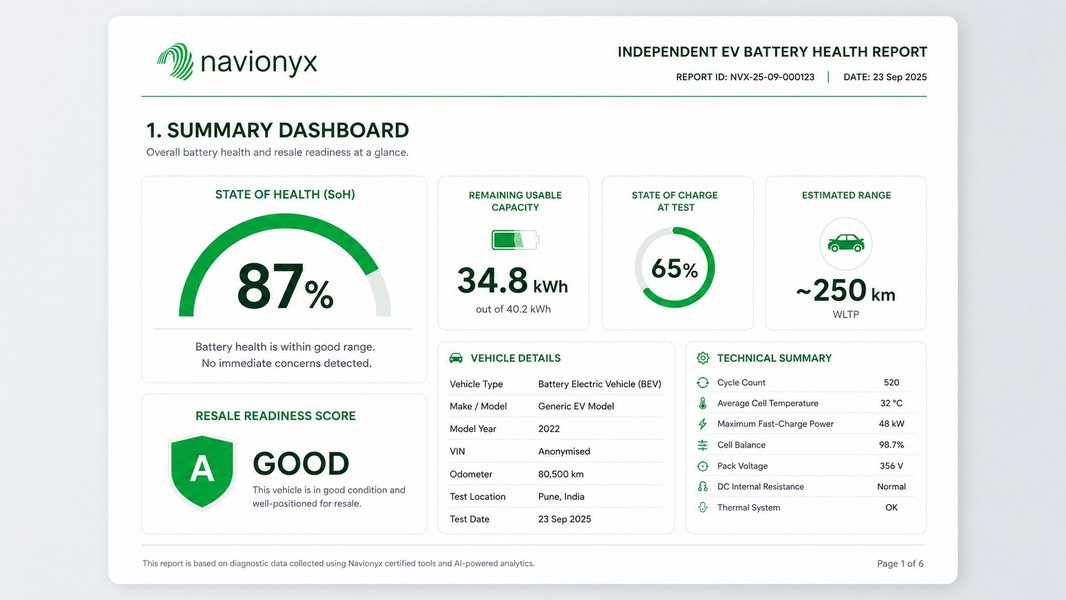
Sample summary dashboard from a professional EV battery health report.
Comparative Overview of Battery Health Check Methods
Here's a quick comparison of the different methods available to assess your EV's battery health, highlighting their strengths and limitations:
| Method | Accuracy | Cost | Best For | Key Considerations |
|---|---|---|---|---|
| Built-in Vehicle Displays/Apps | Medium (estimated) | Free | Daily monitoring, quick overview | Range estimates influenced by external factors; not all cars show SoH. |
| OBD-II Scanner + Third-Party App | High (BMS data) | Low-Medium ($25-$150) | DIY owners, serious used EV shoppers | Requires compatible app/scanner; some models (e.g., Tesla) need special harnesses. |
| Professional Diagnostic Report | Very High (certified) | Medium-High ($250-$500) | Buying/selling used EVs, warranty claims, complex issues | Provides official documentation; appointment required. |
| Real-World Range Test | Practical (indicative) | Free | Baseline check, comparing against new specs | Needs consistent conditions; not a direct SoH percentage. |
Running a Repeatable Real-World Range Test
While not providing a numerical SoH, a consistent real-world range test offers practical insight into your battery's usable capacity. This is particularly useful when formal reports are unavailable or as a complementary check.
- Optimal Conditions: Choose a day with mild weather (avoid extreme heat or cold) and minimal wind. Ensure your tires are properly inflated.
- Full Charge and Precondition: Charge your EV to 100% (unless it's an LFP battery, which generally prefers routine 100% charges; for NMC/NCA, 80% is often recommended for daily use, but 100% is needed for this test). Precondition the battery if your vehicle has the feature.
- Document Starting Conditions: Take a photo of your dashboard showing the 100% SoC, estimated range, outside temperature, and odometer reading. Reset your trip meter.
- Drive Naturally: Drive your typical mix of roads (city/highway) at legal and consistent speeds. Avoid aggressive acceleration and hard braking.
- Drive Until Low: Continue driving until the battery reaches a low State of Charge (e.g., 10-20%).
- Record Ending Details: Note the new odometer reading, the actual miles driven on the trip meter, and the average energy efficiency (e.g., kWh/100 km or mi/kWh).
- Analyze and Repeat: Compare the actual miles driven to the initial estimated range and your model's original rated range. Repeat this test on another day to average out minor variations and get a more reliable understanding.
Important Note: If your achieved range is consistently much lower than expected, but your average energy efficiency (mi/kWh or kWh/100km) remains normal, it's a strong indicator of battery capacity loss, rather than inefficient driving.
Understanding SoH Numbers: Normal vs. Concerning
Knowing what constitutes a healthy SoH percentage for a given EV age is key to interpreting your findings.
- Year 1-2: ~95-98% SoH. A small initial drop is common, after which the degradation curve typically flattens.
- Year 3-4: ~88-92% SoH. This is typical for modern EVs with good thermal management and a mix of AC/DC charging habits.
- Year 8: ≥80% SoH. Many manufacturer warranties are structured around this threshold. The exact percentage can vary by model and climate.
When to Be Concerned: Red Flags for Battery Health
While some degradation is normal, certain patterns indicate more serious issues that warrant investigation:
- Rapid Loss: More than 5% loss in the first 12 months of normal use, or a drop exceeding 20% by year 5 without severe operating conditions.
- Uneven Cell Degradation: Large differences in voltage or temperature between individual cells or modules within the battery pack, detected via OBD-II apps or professional diagnostics.
- Sudden Drops: Unexplained, sudden decreases in capacity or range without changes in usage patterns or environmental factors.
- Capacity Below Warranty Thresholds: If your battery's SoH falls below the manufacturer's warranty limit (often 70%) before the warranty period expires.
- Persistent Warnings: Frequent battery-related warning lights, thermal derating messages, or charging faults that don't resolve.

Another example of a low battery warning on an EV dashboard.
Proactive Tips to Extend Your EV Battery's Lifespan
While checking battery health is reactive, adopting good habits can proactively slow degradation and keep your SoH higher for longer.
- Optimize Charging Habits:
- The 20-80% Rule: For daily driving with Nickel Manganese Cobalt (NMC) or Nickel Cobalt Aluminum (NCA) batteries, aim to keep your charge level between 20% and 80%. This minimizes stress on the battery cells.
- LFP Batteries: If your EV has a Lithium Iron Phosphate (LFP) battery, it generally tolerates and even prefers being charged to 100% regularly. Always follow your manufacturer's specific recommendations.
- Limit Frequent DC Fast Charging: While convenient for road trips, frequent high-power DC fast charging generates heat and can accelerate degradation. Rely more on Level 2 (AC) home or public charging for routine top-ups.
- Avoid Deep Discharges: Try not to regularly let your battery drop below 10-15% State of Charge.
- Manage Temperature Exposure:
- Avoid Extremes: Prolonged exposure to very high (above 80°F/27°C) or very low (below 23°F/-5°C) temperatures can negatively impact battery health. Park in shaded areas in summer and consider a garage in winter.
- Preconditioning: Utilize your EV's preconditioning features to warm the battery before driving or fast charging in cold weather, and to cool it before charging in hot weather.
- Drive Smoothly: Aggressive driving (rapid acceleration and hard braking) puts more stress on the battery compared to smooth, moderate driving. Gentle driving not only conserves energy but also contributes to battery longevity.
- Stay Updated: Manufacturers often release software updates that include optimizations for battery management, improving efficiency and prolonging life. Ensure your EV's software is current.
FAQs: Your Burning Questions About EV Battery Health Answered
Conclusion: Drive Confidently with Battery Health Knowledge
Checking your EV's battery health is no longer a complex task reserved only for technicians. In 2026, a wealth of accessible tools and information empowers both current and prospective electric vehicle owners. By understanding the critical metric of State of Health (SoH), utilizing built-in vehicle features, leveraging affordable OBD-II scanners and specialized apps, and knowing when to opt for professional assessments, you can make informed decisions about your EV.
Remember that some battery degradation is a normal part of ownership. The key is to understand where your battery stands relative to these normal aging patterns. With the methods and knowledge outlined in this guide, you can confidently assess any electric vehicle's battery health, ensuring peace of mind, protecting your investment, and continuing to enjoy many reliable miles of electric driving.
